Philips SpeechLive Professional AI Assistant 

Create documents tailored to the way you work

Create custom templates and turn audio and supporting files into structured, ready-to-review documents.

A diverse team collaborates on strategies using laptops in a bright, modern workspace that fosters creativity

Highest levels of certification and compliance globally

ISO 9001 certified logo
GDPR compliant logo
ISO 27001 certified logo
EU AI Act compliant logo
ISO 14001 certified logo
ISO 9001 certified logo
GDPR compliant logo
ISO 27001 certified logo
EU AI Act compliant logo
ISO 14001 certified logo

Increase your efficiency

A faster way to create professional documents

Documentation should not slow down your working day. SpeechLive Professional helps you turn dictation and supporting files into structured document drafts without starting from a blank page or waiting until after your meeting.

Dictate naturally or upload your pre-recorded audio, create a template tailored to your needs, then add any supporting files – and the AI Assistant places all relevant information into your editable draft ready for review, refinement, or delegation.

AI report icon

Create documents faster: Turn your voice and any supporting files into a structured first draft in seconds, reducing the time spent typing, formatting, and preparing documents manually

Keyboard icon

Adapt documents to your work: Create custom templates for different document types, clients, or processes instead of adapting your work to a fixed template library.

Dictation workflow icon

Keep your existing workflow: Review and finalize documents yourself or delegate them to another team member for further editing. SpeechLive gives you the flexibility to work the way that suits you, under your full control

Three colleagues reviewing printed documents prepared using Philips SpeechLive.

From voice to structured document

SpeechLive Professional brings AI-powered Speech Recognition, custom templates, and established SpeechLive workflows together in one secure platform.

A woman wearing a headset sits at a desk in a bright office, typing at a computer; a transcription foot pedal is visible on the floor beneath her feet.

Create your template

Upload audio or dictate naturally and let AI-powered Speech Recognition convert your recording into accurate text.

Describe the document you need in plain language. SpeechLive Professional AI Assistant generates a custom document template that you can review and adapt.

Businesswoman speaking on the phone holding files in her hand

Generate your document

SpeechLive Professional uses your spoken information to populate the selected template and create a structured, editable draft.

You can also upload multiple supporting files to create a complete draft document tailored to your needs and the way you work.

Two colleagues reviewing paperwork and digital documents created with Philips SpeechLive.

Review or delegate

Review, edit and finalize the document yourself or send it to a typist for further review and formatting through your existing SpeechLive workflow.

AI-Assisted efficiency, under your control

SpeechLive Professional adds AI-Assisted document generation to the established SpeechLive dictation and transcription workflow.

Use the AI Assistant to generate a structured first draft, then choose what to change and what to keep. Review and generate the final document yourself or delegate it to an typist for further editing and quality control.

You remain in control of every document and every step of the workflow.

Business team discussing a meeting documented with Philips SpeechLive.

End-to-end solution

Create the document your work requires

Every organization documents information differently. SpeechLive Professional lets you create custom templates for your own processes and use them whenever you need them.

Balloon speech checkmark

Describe the template you need using natural language

Transcription service icon

Edit templates using text or voice

Fast document icon

Adapt the structure, add additional files for a more complete draft, and edit according to your requirements

Report with checkmark icon

Generate consistent documentation across your organization

Construction professionals reviewing building plans and using Philips SpeechLive on site.

Designed for documentation-intensive work

Puzzle icon

Education

Create student evaluations, meeting summaries, institutional reports, and other structured documents.

Architecture

Create design briefs, outline specifications, site visit reports, architectural specifications and more.

Shield with checkmark icon

Insurance

Create claim assessments, inspection reports, case summaries, and policy documentation.

Money icon

Financial services

Draft client meeting notes, advisory summaries, assessment reports, and internal documentation.

Person portrait group icon

Public sector

Prepare administrative reports, briefings, and standardized records.

Home icon

Construction and real estate

Complete site reports, property assessments, inspection records, and project updates wherever work takes place.

Icon for the construction industry

Engineering

Draft site inspection and walkthrough logs, meeting minutes and action items, change order justifications, commissioning reports and others.

Multifactor authentication icon

General professionals

Transform meeting audio into notes and action items, dictate your thoughts on your commute into structured draft documents and much more.

Powered by AI Speech Recognition

SpeechLive Professional AI Assistant uses AI Speech Recognition to ensure spoken audio is transcribed accurately before the AI Assistant drafts your document.

This engine performs reliably across multi-speaker settings and noisy environments, delivering clean, accurate text that gives the AI Assistant a reliable foundation to build on. Included with the SpeechLive Professional AI Assistant, AI Speech Recognition works with both uploaded audio and live dictation across web, desktop, and mobile.

Built on top of SpeechLive

SpeechLive Professional is an add-on layer built on top of our existing SpeechLive platform, already used by thousands of professionals worldwide to create, route and manage dictation and transcription workflows.

SpeechLive Professional includes all the workflows and functionalities of SpeechLive, with our AI Assistant working on top in conjunction with AI Speech Recognition for increased accuracy in voice to documentation . It is designed to enhance existing SpeechLive workflows rather than replace them.

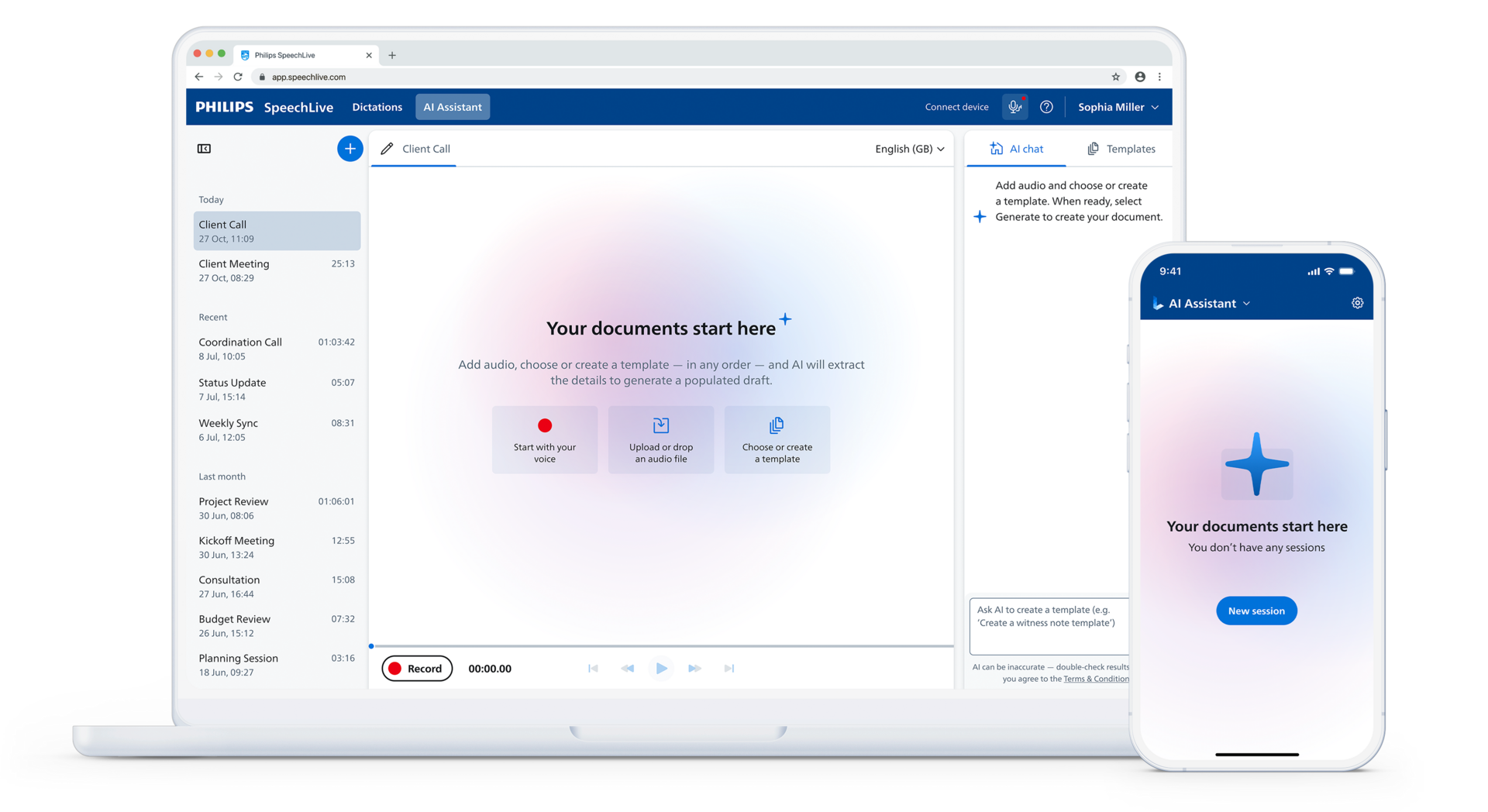
User interface image of a laptop and phone with Philips SpeechLive Professional AI Assistant

Pricing

Turn audio into structured professional document drafts for your review

Dictate or upload audio, add additional supporting files, create your own custom templates, and the Professional AI Assistant creates draft documents ready for review, powered by AI Speech Recognition.

  • Unlimited AI-assisted document drafts
  • Create fully custom templates
  • Natural language editing, e.g. “add a section”
  • Combine audio with additional supporting sources, including PDFs and images
  • AI Speech Recognition delivers accurate text for the AI Assistant to use
  • SpeechLive workflows 
AI icon

Professional AI Assistant

Structured document drafts


R958.80/user/month

All-in bundle price, excl. VAT, billed annually — special introductory offer for 2026


Includes

  • Professional AI Assistant
  • AI Speech Recognition
  • SpeechLive Enterprise workflow

Secure

Your data's safety is our priority

With SpeechLive Professional, your data security is protected with robust encryption, strict compliance standards, and reliable backup solutions.

We build security into every layer of our platform, from encrypted recordings to role-based access controls, your information stays private, secure, and fully compliant at every stage of the workflow.

Icon secure and certified

Secure and certified

We partner with Microsoft Azure – the world’s leading platform for cloud-hosted enterprise solutions – to ensure the highest level of security for your dictations and AI processing. Azure provides advanced protection, strict compliance certifications, and secure isolation of customer data.

Icon regional data storage

Regional storage

Your data is stored on Microsoft Azure servers within your geographic region and never transferred outside your designated storage location. This ensures compliance with local data-protection laws and provides fast, reliable access. All AI processing occurs within the same secure environment and is automatically deleted once completed.

Backup and data recovery icon

Reliability, backup & recovery

SpeechLive runs on Microsoft Azure’s highly resilient cloud infrastructure, delivering a 99.9% uptime guarantee for uninterrupted access to all services. To safeguard your work, SpeechLive offers secure backup options and allows account administrators to recover accidentally deleted dictations for up to 30 days.

No AI model training icon

Personal data never used to train AI models

Your personal data is never used to train SpeechLive Professional AI Assistant, third-party models, or AI systems. Recordings, transcripts, and processed data remain fully private and are used exclusively to generate your results- never for model improvement. AI-processed data is always cleared automatically after processing.

Experience SpeechLive Professional in action

Book a session with one of our product specialists and see how SpeechLive helps you achieve faster, simpler and more accurate transcription and speech recognition in the office or on the go.