Transcription service
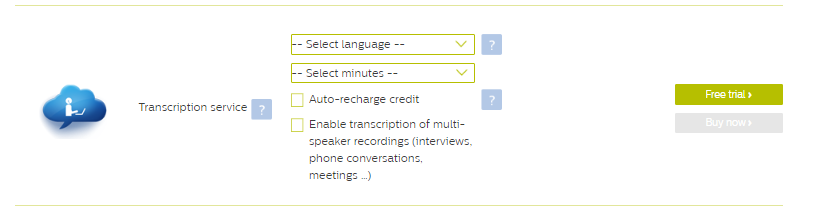
In this section you can purchase transcription service credits. If the SpeechLive transcription service was not enabled in your account so far, you also have the option to select the transcription service language and to use the transcription service trial credits.
Item | Description |
|---|---|
Select language | Select the language of the transcription service. There are four options available:
CautionAfter the order it is not possible to change the transcription service language. |
Select minutes | Select the number of minutes you would like to purchase or select the 10 minute free trial option if the SpeechLive transcription service has not been used yet. You can purchase between 20 and 2500 minutes in the SpeechLive online shop. NoteThe selected value will also be used as the default value for automatic recharge of transcription service credits. |
Auto-recharge credit | If this setting is enabled SpeechLive will automatically top-up your transcription service credits by the selected amount if the available credits fall below a certain threshold level. The lower limit can be defined in the SpeechLive Account > SpeechLive transcription service settings. NoteWe recommend to enable this setting for seamless operation. |
Enable transcription of multi-speaker recordings | If this setting is enabled SpeechLive workflow users can define the number of speakers before sending off multi-speaker dictations for transcription. Note
|
To order the transcription service proceed as follows:
Click on Free trial to order your free trial transcription service credits.
Click on Buy now to purchase transcription service credits.
Confirm your order by clicking on Pay on the next page or go back by clicking on Cancel.
After clicking on Pay the transcription service credits will be added and your account will be debited on the stored payment method (credit card or direct debit).
Caution
It is not possible to cancel any transcription service credit orders later on.