Author player
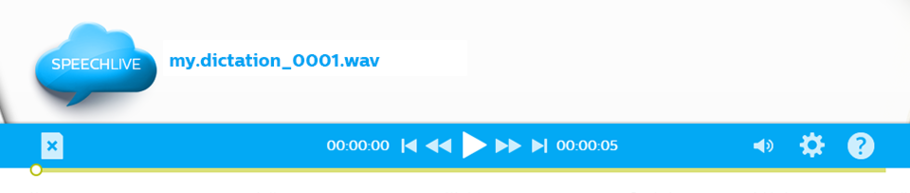
The SpeechLive web player for authors is displayed to authors for playing back dictations.
It can be controlled via the built-in dictation control buttons and provides configuration options for playback volume and speed.
The SpeechLive web player for authors does not include any workflow buttons besides closing the dictation.
Note
The SpeechLive web player for authors cannot be controlled with a SpeechMike nor with a Philips foot control.
Player functions
Icon | Description |
|---|---|
 | Play/Pause: Start and Stop playback of the recorded sound file |
 | Fast rewind |
 | Fast forward |
 | Jump to begin |
 | Jump to end |
Workflow options
Icon | Description |
|---|---|
 | Close: Closes the player without saving any changes. |
Settings
Icon | Description |
|---|---|
 | Playback volume |
 | Player settings: Opens the playback settings pop-up window which enable you to change the Playback speed and the Winding speed. NoteThe Auto-backspace setting is not supported in the web player for authors. |
 | Online help: Opens this online help. |
Other Player elements
Item | Description |
|---|---|
Position slider | Provides graphic indication about the current position in the dictation. The position slider can be dragged with the mouse. |
Current position/Remaining time | The current position display is placed on the left side of the dictation buttons. It displays the current position in the dictation in HH:MM:SS. The display of the current position can be switched to the display of the remaining time. Click on the Current Position display to switch the display to Remaining time. The remaining time is then displayed as a negative value.  Click on the Remaining Time display to return to the Current Position display. |
Total length | The total length display is placed on the right side of the dictation buttons. It displays the total length of the dictation in HH:MM:SS. |
Note
The SpeechLive web player can play back DS2 files in unencrypted format only. If you want to play back encrypted DS2 files or dictations in the legacy DSS format, please use SpeechExec Pro Dictate or SpeechExec Pro Transcribe software and connect it to your SpeechLive profile.
MP3 files can be encoded as CBR (Constant Bit Rate) and VBR (Variable Bit Rate) as well, but the SpeechLive web player supports the playback of CBR-encoded MP3 files only, that is, playback is not fully supported with VBR-encoded files. For more information on CBR and VBR bit rates, see en.wikipedia.org/wiki/Variable_bitrate.