Use SpeechMike in Browser Mode
After you changed the SpeechMike to Browser Mode, you can control SpeechLive with the buttons of your SpeechMike, see SpeechMike - Button devices or SpeechMike - Slider devices fore more details.
Note
Firmware 3.50 or above is required to use the Browser mode with your SpeechMike Premium Touch. See Upgrade the firmware of your dictation hardware for more information on how to upgrade your devices.
A description on how to define the SpeechMike as your default recording device can be found in the chapter Problems with sound recording.
To enable the Browser mode on your SpeechMike proceed as follows:
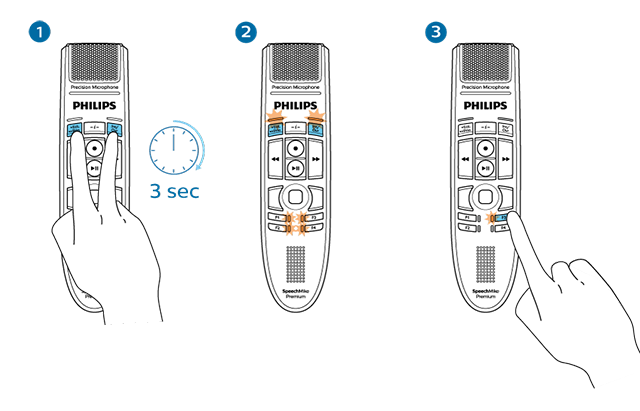
Press EOL and INS/OVR simultaneously for 3 seconds.
All corresponding LEDs will start flashing. You can now change the SpeechMike button mode for 10 seconds.
Click on F3 to switch your SpeechMike to Browser mode. The F3-LED will light up to confirm the new button mode setting.
Note
You have 10 seconds to select a mode. After 10 seconds, you will automatically exit mode selection and need to restart the mode selection steps.
You can always check your current button mode by briefly pressing the End-of-letter/priority (•EoL/••Prio) button and the Insert/overwrite (INS/OVR) button simultaneously.
The LED assigned to the current mode shortly lights up orange, e.g. if the currently activated mode is the Browser mode, the LED of the F3 button lights up orange.
If the displayed mode does not match the Browser mode please change the mode as described above.
Control SpeechLive with your SpeechMike
After the setup is complete, you can control the web recorder with the following buttons of your SpeechMike:
The SpeechLive web recorder can be controlled with a SpeechMike with following buttons:
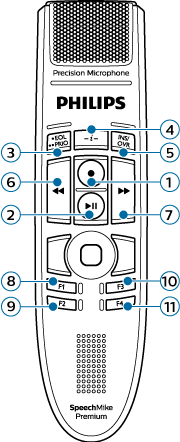
No. | Button description | Assigned function |
|---|---|---|
1 | Record | Record toggle Start a new dictation (when in dictation tab) |
2 | Play/Pause | Play/Pause |
3 | EOL | Finish dictation |
4 | -i- | - |
5 | INS/OVR | Insert/Overwrite/Append |
6 | << (Rewind) | Rewind |
7 | >> (Fast Forward) | Fast Forward |
8 | F1 | Jump to begin |
9 | F2 | Jump to end |
10 | F3 | - |
11 | F4 | - |
Note
When working in Browser mode the RECORD LED of the SpeechMike will always be off. Please use the record status display of the web recorder as your reference.
The SpeechLive web recorder can be controlled with a SpeechMike with following buttons:
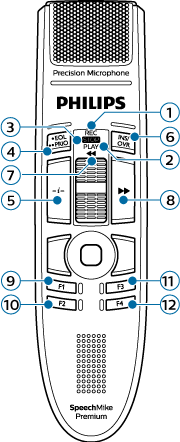
No. | Button description | Assigned function |
|---|---|---|
1 | Record | Record toggle Start a new dictation (when in dictation tab) |
2 | Play | Play/Pause |
3 | Stop | Stop |
4 | EOL | Finish dictation |
5 | -i- | - |
6 | INS/OVR | Insert/Overwrite/Append |
7 | << (Rewind) | Rewind |
8 | >> (Fast Forward) | Fast Forward |
9 | F1 | Jump to begin |
10 | F2 | Jump to end |
11 | F3 | - |
12 | F4 | - |
Note
When working in Browser mode the RECORD LED of the SpeechMike will always be off. Please use the record status display of the web recorder as your reference.