Use SpeechOne with Philips Device Connector
Google Chrome Browser (Windows, macOS) or Microsoft Edge (Windows) is required to use Philips Device Connector.
Make sure to use your devices (SpeechMike, SpeechOne) in Event Mode. This is the default out-of-the-box button mode, however if you changed the button mode of your device you can find more information in the Switch to Event mode section on how to switch it back.
X Continue to the full installation guide of the Philips Device Connector.
Control SpeechLive with your SpeechOne
After the setup is complete, you can control the web recorder with the following buttons of your SpeechOne:
In the SpeechLive web recorder you can start and stop recording by pressing the Record button  on the docking station.
In the SpeechLive web recorder you can start and stop recording by pressing the scroll wheel Headset button.
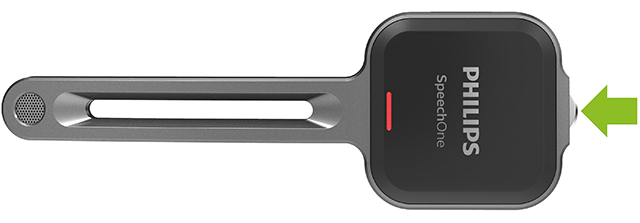
The SpeechLive web recorder can be controlled with a SpeechOne remote control with the following buttons:
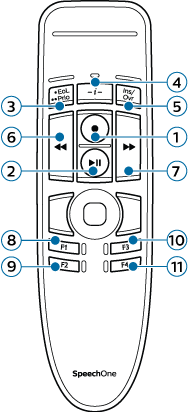
No. | Button description | Assigned function |
|---|---|---|
1 | Record | Record toggle |
2 | Play/Pause | Play/Pause |
3 | EOL | - |
4 | -i- | - |
5 | INS/OVR | Insert/Overwrite/Append |
6 | << (Rewind) | Rewind |
7 | >> (Fast Forward) | Fast Forward |
8 | F1 | Jump to begin |
9 | F2 | Jump to end |
10 | F3 | - |
11 | F4 | - |
Note
When working in Browser mode the RECORD LED of the SpeechOne remote control will always be off. Please use the record status display of the web recorder as your reference.